Toteat software for restaurants: One, two, or more? How to know how many screens a restaurant kitchen needs
There is no standard number of kitchen screens for restaurants. The right amount depends on the kitchen layout, how many stations are operating simultaneously, the volume of orders, and the channels through which orders are received.
Therefore, before installing a KDS (Kitchen Display System), it is advisable to understand how information flows within the restaurant.
How many stations are there? What products does each one prepare? How many orders are received during peak hours? Does the kitchen also handle deliveries?
The answers help determine what type of kitchen display system each operation actually needs.
What is a KDS and what is it used for in a restaurant?
A KDS, or Kitchen Display System, is a system that allows orders to be managed digitally within the kitchen.
Instead of relying exclusively on printed orders or verbal instructions, orders can be displayed on screens and distributed according to the stations responsible for each preparation.
Thus, one station can receive the information it needs to prepare its products, while other areas manage their own tasks.
The goal is not simply to replace paper with a screen. A KDS for restaurants aims to streamline the flow of information during service and facilitate coordination between different areas of the kitchen.
How many kitchen screens does a restaurant need?
The answer depends primarily on the stations that work independently.
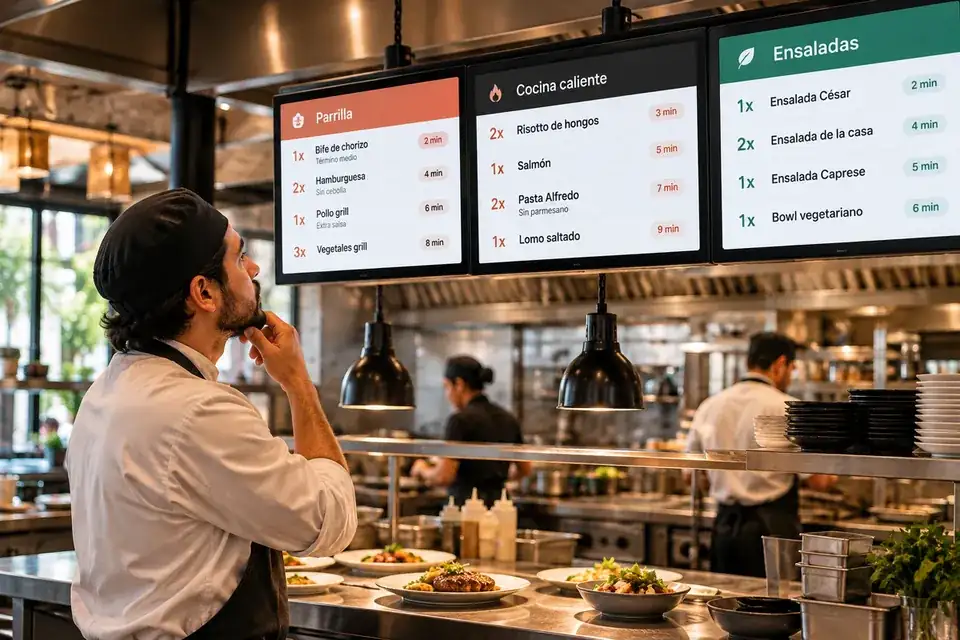
A small kitchen, where one or two people prepare most of the products, can function with just one screen.
In contrast, a restaurant with separate stations for hot, cold, fried foods, desserts and drinks may need several display points.
Therefore, a good starting rule is:
Don't count people. Count independent workstations.
If two cooks work on the same orders and coordinate the same station, they probably don't each need a screen.
If two areas work independently and need to consult different information, it may make sense to separate them.
3 factors to calculate how many screens your kitchen needs
1. Number of stations
The first step is to identify all the areas involved in the preparation.
For example:
- Griddle or grill
- Fried foods
- Hot kitchen
- Cold
- Desserts
- Outside
- Expedition or Pass
Not all of them necessarily need a screen.
The question is whether each station needs to receive and manage information independently.
2. Order volume
A kitchen that receives 20 orders during an hour may have very different needs than one that receives hundreds.
During peak demand times, coordination problems often arise: accumulated orders, lost orders, pending products, or workers who have to move around to find out what to prepare.
Therefore, when defining the number of kitchen screens, it is advisable to analyze what happens during the busiest time and not just during a quiet service.
3. Sales channels
Orders can come from different channels: dining room, counter, digital channels or delivery platforms.
When everyone arrives at the same kitchen, the team needs to organize those flows to prevent them from mixing up.
A restaurant with a high volume of home deliveries, for example, may need a different setup than a restaurant that primarily handles dining-in orders.
Is it necessary to have one screen per station?
Not always.
Installing a screen at each station may seem like the simplest solution, but it is not necessarily the most efficient.
On the other hand, if each station receives different products, has different preparation times, and works independently, separating the information can facilitate the operation.
Therefore, the number of kitchen screens for restaurants should correspond to the actual workflow and not to a universal formula.
Where should the kitchen screens be located in your restaurant?
Location also matters.
A screen can be very useful, but if the team has to constantly scroll to consult it, it loses part of its purpose.
Before installing a KDS system, you should observe:
- From what point does each station operate?
- What information do you need to consult?
- How visible should the screen be?
- How much activity is there around each stall?
- Where orders are shipped.
In large kitchens, it can be more efficient to distribute several screens than to concentrate all the information in a single point.
What about delivery orders?
Delivery can significantly alter the flow of a kitchen.
Orders received from external platforms have their own preparation and delivery times. They may also coincide with orders from the salon or the counter.
A good KDS configuration can help organize these orders and make their status more visible during preparation.
In operations with a high volume of home deliveries, it can also be useful to have a dispatch station that allows you to check which orders are complete and ready to leave.
5 signs your restaurant needs to overhaul its kitchen system
It's not always necessary to increase the number of screens. Sometimes the problem lies in how the information is distributed.
These situations may indicate that the operation needs to be reviewed:
- The team is constantly asking what order they should prepare.
- Orders accumulate during peak hours.
- One station finishes its preparation, but the rest of the team doesn't know it.
- Delivery orders are mixed with those from the dining room.
- Workers have to travel to find out what is pending.
When these problems recur, it's worth considering whether a kitchen screen system could help to better organize the workflow.
How does a KDS work in a restaurant?
The operation depends on the system, but normally the flow begins when an order is registered at the point of sale.
The information then reaches the relevant stations. Each area can view the products it needs to prepare and update their status as the order progresses.
This allows the kitchen to have a clearer view of what is pending, in preparation, and ready for delivery.
For example, Toteat's KDS connects orders taken from the POS with the different kitchen stations, allowing information to be organized according to the needs of each operation.
One screen or several? The answer lies in the workflow.
The appropriate number of screens depends on the combination of stations, order volume, and sales channels.
A small operation may only need one screen. A kitchen with several independent stations may require more display points. And an operation with a high volume of deliveries may also need a screen dedicated to dispatch.
The important thing is that the technology adapts to the way the kitchen works.
Before deciding how many screens to install, observe what happens during the most demanding service: where orders accumulate, what information each station needs, and when the team wastes time looking for answers.
From there it will be much easier to define what configuration your restaurant needs.
If you want to learn how a KDS for restaurants works and see how it could be adapted to your operation, you can [Schedule a Toteat demo →].